The AI Workflow Audit: Find Where Your Workday Is Going
Most employees aren’t wasting time because they’re inefficient—the process is. An AI Workflow Audit helps businesses identify repetitive tasks, unnecessary steps, and manual work that can be automated or eliminated. The goal isn’t to add more technology. It’s to give employees their time back.

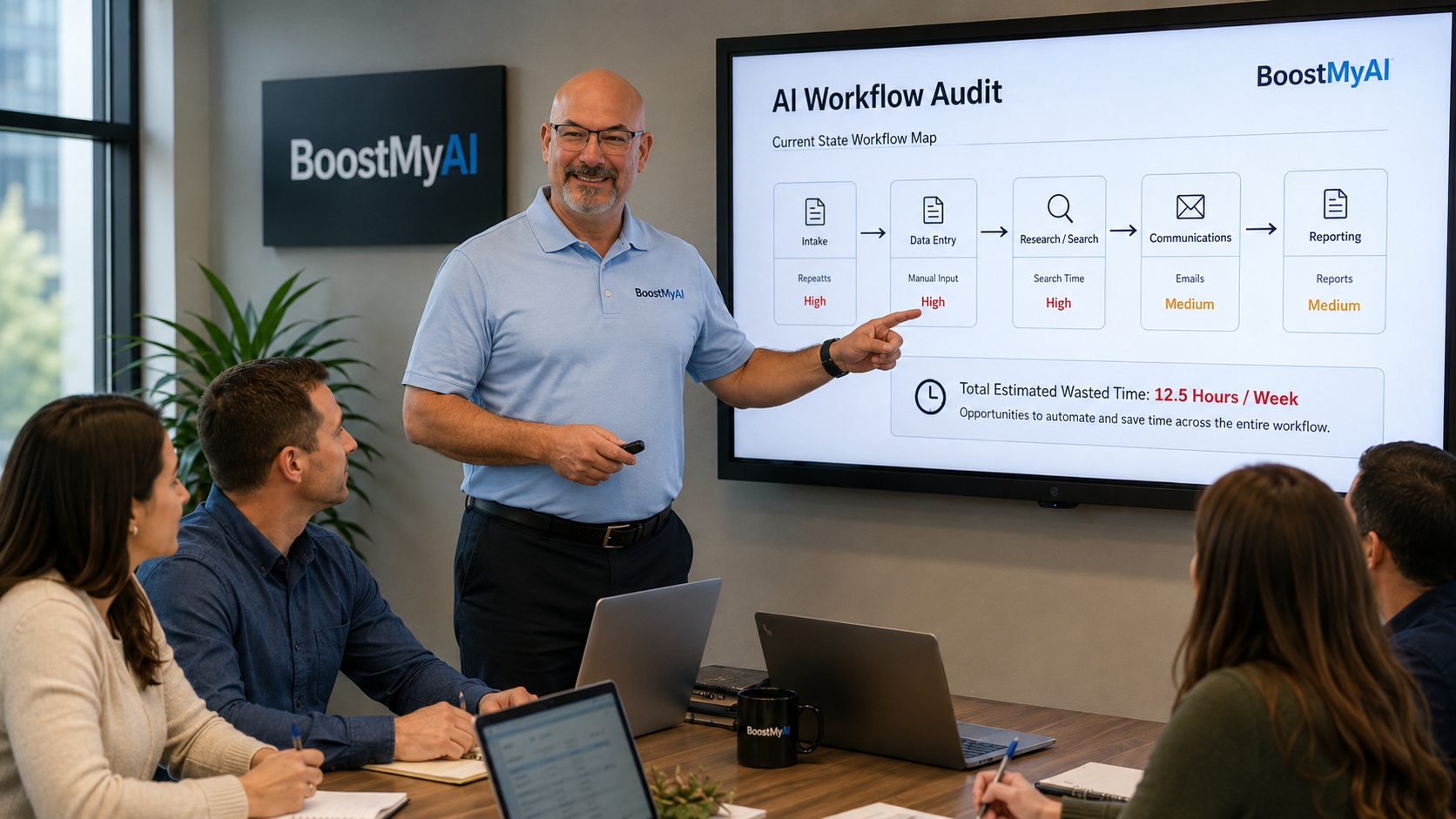
Most employees aren’t wasting time because they’re lazy. If they are, that's a problem AI cannot assist with...
They’re wasting time because the process is inefficient.
Copy this information into that spreadsheet. Then enter it again into another system. Search through an email chain to find the attachment somebody sent three weeks ago. Reformat a report. Update the same numbers in three different places. Sit through a meeting to discuss something that could have been summarized in five minutes.
We’ve accepted a lot of this as “just part of the job.”
It doesn’t have to be.
One of the most practical ways businesses can use artificial intelligence today is something we call an AI Workflow Audit: examining how employees actually get their work done and identifying repetitive, unnecessary, or overly manual steps that AI can help eliminate.
The goal isn’t to replace employees.
It’s to stop wasting their time.
Start With the Employee, Not the AI
Businesses often make a mistake when adopting AI.
They start by asking:
“What can AI do?”
A better question is:
“What are our employees doing every day that they shouldn’t have to do anymore?”
That completely changes the conversation.
Instead of introducing another shiny piece of software, you begin by looking at an employee’s normal workday.
What reports do they create?
What information do they repeatedly look up?
What emails do they write over and over?
What data do they enter manually?
What documents do they review?
What questions are they constantly answering?
Where are they copying and pasting information between systems?
Those are your opportunities.
What an AI Workflow Audit Looks Like
An AI workflow audit doesn’t have to be complicated.
Start with a single employee or department and walk through their normal responsibilities.
Ask them to document the tasks they perform during a typical week.
Then look for four things:
Repetition
Does the employee perform essentially the same task repeatedly?
Examples might include creating recurring reports, sending similar emails, summarizing information, preparing meeting notes, or answering the same customer or employee questions.
AI may be able to handle much of the first draft or preparation work.
Searching
How much time is spent trying to find information?
Policies. Procedures. Customer requirements. Pricing. Previous emails. Training material. Technical instructions.
Instead of employees searching through folders, emails, SharePoint sites, or massive manuals, businesses can build AI knowledge assistants that allow employees to simply ask a question.
“What is our procedure for this?”
The AI finds the answer.
Moving Information
This is one of the biggest hidden time drains in business.
Employees take information from an email and put it into a spreadsheet.
Then somebody takes information from the spreadsheet and enters it into another program.
Then someone else creates a report from that information.
Every step takes time and introduces another opportunity for error.
Many of these workflows can now be automated or dramatically shortened using AI.
Creating
Employees spend enormous amounts of time creating routine business content:
- Emails
- Reports
- Summaries
- Meeting notes
- Training material
- Customer follow-ups
- Documentation
- Procedures
- Presentations
AI doesn't necessarily need to create the finished product.
Often, simply creating a strong first draft can cut a 30-minute task down to five.
Multiply that across hundreds of tasks over a year and the savings become significant.
Ask One Simple Question
During a workflow audit, ask employees:
“What part of your job makes you think, ‘There has to be an easier way to do this’?”
Pay attention to the answers.
Your employees already know where the inefficiencies are.
They live with them every day.
The problem is that businesses rarely stop long enough to ask.
Don't Automate a Bad Process
There is another important lesson.
Not every process should be automated.
Sometimes the correct answer isn't using AI to perform a task faster.
The correct answer is eliminating the task entirely.
If an employee creates a report every Friday that nobody actually reads, you don't need an AI agent to create the report.
You need to stop creating the report.
Technology should simplify your business—not allow unnecessary bureaucracy to move faster.
Small Improvements Add Up Quickly
Imagine an employee spends:
15 minutes preparing a daily report.
20 minutes searching for information.
30 minutes responding to repetitive emails.
20 minutes documenting meetings or conversations.
That's more than an hour every day.
Now imagine AI and automation eliminate just half of that work.
Across five employees, you may recover more than 12 hours of productive time every week.
Across a year, that becomes hundreds of hours.
And unlike many cost-cutting initiatives, you haven't reduced your workforce.
You've increased what your existing workforce is capable of accomplishing.
AI Should Remove Work, Not Add Work
Employees are understandably skeptical when management announces another new piece of technology.
Usually it means another password, another system, another training session, and another thing they're expected to maintain.
That's the wrong approach to AI.
Employees should notice something different.
Their job should become easier.
The weekly report takes five minutes instead of thirty.
The policy they used to spend ten minutes searching for appears in seconds.
Meeting notes are automatically summarized.
Routine emails are drafted.
Forms are completed faster.
Information is easier to find.
That is when AI adoption starts making sense to employees.
Start With One Workflow
You don't need to redesign your entire company.
Pick one employee.
Pick one repetitive process.
Document how it works today.
Identify where time is being wasted.
Then ask:
Can AI remove a step, automate a step, or make this step significantly faster?
Fix it.
Measure the results.
Then move to the next workflow.
That's how meaningful AI adoption happens—not through massive transformation projects, but through dozens of small improvements that gradually change how a company operates.
Your Employees Already Know Where to Start
Artificial intelligence is incredibly powerful.
But the greatest opportunity may not be asking AI to invent something new.
It may simply be asking your employees what wastes their time—and then using AI to make that work disappear.
At BoostMyAI, we help small businesses examine their existing workflows, identify practical opportunities for AI and automation, and build solutions around how their employees actually work.
Because the goal isn't to use more AI.
The goal is to waste less time.
Contact us today to get started!