Stop Filling Out Forms: How to Build an AI Assistant That Does the Paperwork for You
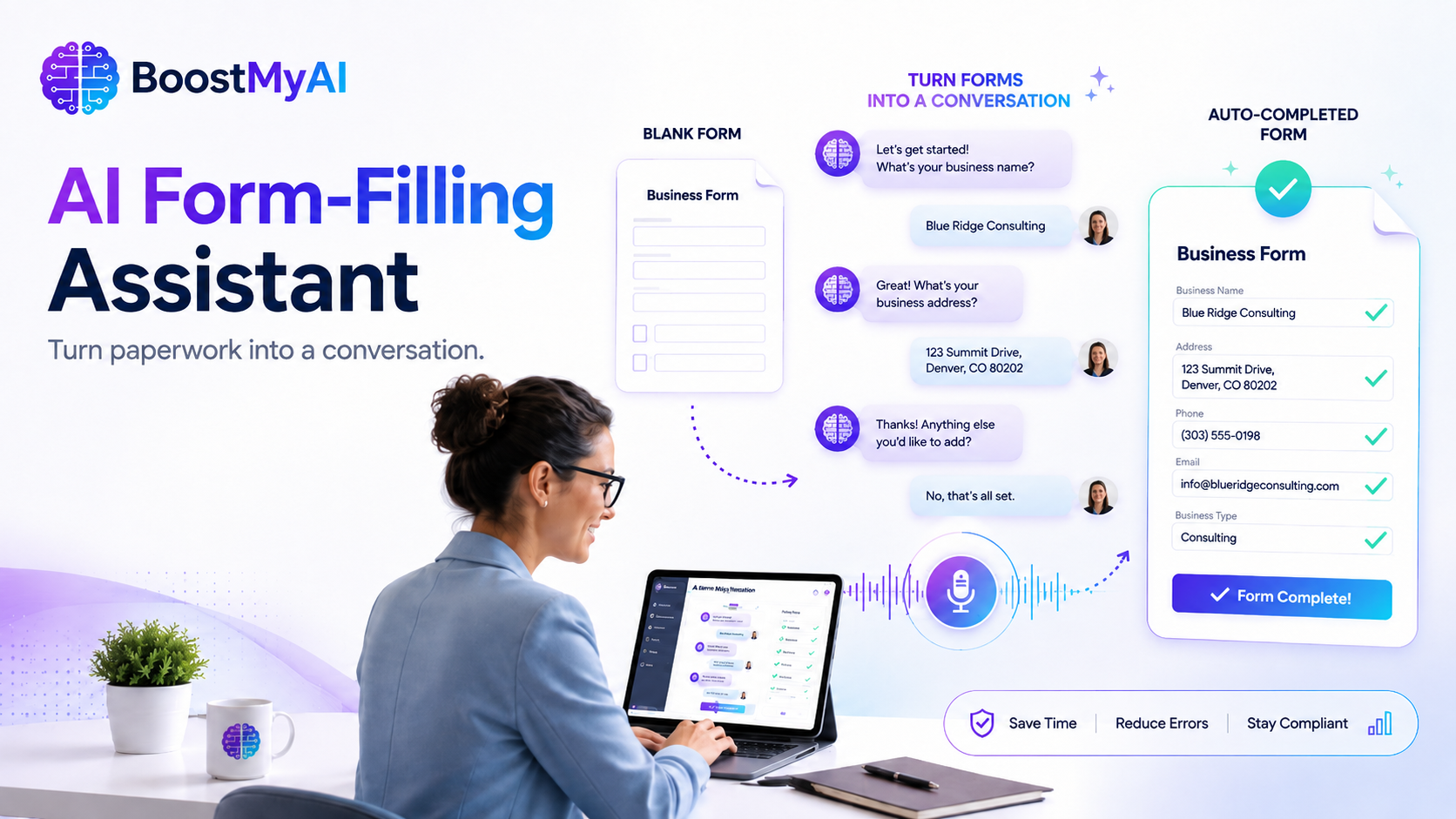
What if completing a complicated business form was as easy as having a conversation? An AI form-filling assistant can ask the required questions, catch missing information and produce a completed document—saving employees time while giving managers cleaner, more consistent records.

Every small business has forms.
Employee incident reports. Customer intake forms. Inspection checklists. Work orders. Insurance paperwork. New-hire documents. Service agreements. Government applications.
The forms may be necessary, but completing them is rarely productive work.
Employees waste time figuring out which form to use, what information belongs in each section and whether they accidentally left something blank. Managers receive incomplete paperwork and must send it back for corrections. Important details get buried in emails, handwritten notes and text messages.
Artificial intelligence can change that.
Instead of handing someone a blank form and expecting them to understand it, a business can create an AI assistant that conducts a simple conversation, asks the required questions and produces a completed document at the end.
The employee or customer does not have to understand the form.
They simply have to explain what happened.
The Idea: Turn the Form Into a Conversation
Imagine an employee needs to complete an incident report.
Normally, the employee must locate the correct document, read every section and decide how to describe the situation. They may skip questions, use vague language or enter information in the wrong place.
With an AI form assistant, the process could begin with one simple statement:
“I need to report an employee injury.”
The assistant would identify the correct form and begin asking questions:
- What is the employee’s full name?
- What date and time did the injury occur?
- Where did it happen?
- What task was the employee performing?
- Please describe exactly what happened.
- Were there any witnesses?
- Was medical treatment requested?
- Was a supervisor notified?
The user could type the answers or speak them aloud.
The AI would place each response into the correct section, identify missing information and ask follow-up questions when an answer is unclear.
Before completing the document, the assistant could provide a summary:
“You reported that John Smith injured his right hand at approximately 2:15 p.m. while unloading a delivery at the north warehouse entrance. Medical treatment was declined, and Supervisor Maria Lopez was notified.”
The user confirms the information, and the assistant generates the completed form.
A complicated document has now become a guided interview.
You Are Not Building an AI Model From Scratch
The phrase “custom AI model” can make the idea sound more complicated than it really is.
Most small businesses would not need to train an entirely new artificial intelligence model. That requires enormous amounts of data, technical expertise and computing power.
Instead, the business would configure an existing AI platform around its own documents and procedures.
The AI assistant could be provided with:
- Blank form templates
- Instructions for completing each form
- Definitions for every field
- Examples of properly completed forms
- Company policies and procedures
- Rules for deciding which form is required
- Escalation instructions for serious situations
This information becomes the assistant’s working knowledge.
The result is not a completely new AI model. It is a specialized business assistant designed to follow a particular process.
That distinction matters because it makes the solution realistic and affordable for small businesses.
How the System Would Work
A basic AI form-filling assistant could follow six steps.
1. Identify the User’s Need
The user explains what they are trying to accomplish.
Examples might include:
- “I need to document employee misconduct.”
- “I need to open a new customer account.”
- “I need to report property damage.”
- “I need to request equipment repair.”
- “I need to complete an inspection.”
The assistant determines which form or process applies.
2. Ask the Required Questions
The AI follows the form section by section.
Instead of displaying every field at once, it asks one clear question at a time. This makes the process easier for people who are unfamiliar with the document or uncomfortable with paperwork.
3. Clarify Incomplete Answers
People do not always provide complete information on the first attempt.
A user may say:
“The equipment stopped working sometime yesterday.”
The assistant could respond:
“Approximately what time did the problem begin, and which piece of equipment was affected?”
The AI does not simply record the answer. It helps improve the answer.
4. Check for Missing Information
Before finalizing the form, the assistant reviews the required fields.
If a witness name, date, signature or account number is missing, it asks for that information before completing the process.
This alone could eliminate a large percentage of forms that managers currently return for correction.
5. Confirm the Information
The assistant presents a plain-language summary and asks the user to confirm that it is accurate.
This provides an important checkpoint before the information becomes part of an official business record.
6. Produce the Completed Document
The final information can be placed into a standardized document, spreadsheet, database record or workflow.
Depending on the business’s technology, the assistant could also:
- Email the completed form
- Save it to a shared folder
- Send it to a manager for approval
- Create a task for follow-up
- Add the information to a customer relationship management system
- Notify the appropriate department
The real value is not merely filling in the blanks. It is connecting the completed form to the next step in the business process.
Where Small Businesses Could Use It
The idea can work in nearly any business that relies on repetitive paperwork.
Employee Documentation
An AI assistant could guide supervisors through counseling forms, attendance reports, accident reports, performance reviews and corrective-action documents.
The assistant could make sure the supervisor includes dates, witnesses, previous discussions and specific examples instead of writing something vague like, “Employee has a bad attitude.”
Customer Intake
Law firms, contractors, insurance agencies, consultants and service companies often collect the same basic information from every new customer.
An AI assistant could conduct the intake interview, collect the necessary details and create a standardized customer file.
Work Orders
A maintenance employee could say:
“The air-conditioning unit in Suite 204 is making a grinding noise and is not cooling.”
The AI could ask about the location, equipment number, urgency, access instructions and contact person before creating the work order.
Inspections and Audits
Employees could complete safety inspections, quality-control checks or facility audits by speaking their observations into a phone.
The assistant could ask every required question and generate a consistent inspection report.
Insurance and Claims
Customers often struggle with insurance forms because they do not know what information is required or how to describe the event.
An AI assistant could guide them through the process while flagging missing documents, dates and supporting evidence.
Applications and Registrations
Businesses regularly complete permit applications, vendor registrations, licensing forms and government documents.
An AI assistant could collect the information once and reuse approved company information across multiple forms.
Why This Is Better Than a Blank Digital Form
Many companies already use online forms.
Online forms are helpful, but they still require the user to understand the question, know the correct answer and recognize when more detail is needed.
A conversational AI assistant can do more.
It can explain unfamiliar terms, ask follow-up questions, detect contradictions and adjust the interview based on previous answers.
For example, if a user says an injury required hospitalization, the assistant could immediately trigger additional questions and notify management.
If the user says no one witnessed the incident, the assistant could skip the witness section.
A traditional form waits for the user.
An AI assistant actively guides the user.
Start With One High-Volume Form
The best way to build this type of system is not to upload every form the company has and hope the AI figures it out.
Start with one form that is completed frequently and causes repeated problems.
A good starting form has three characteristics:
- It is used often.
- Employees regularly complete it incorrectly.
- Missing information creates delays or risk.
An incident report, customer intake form or work order may be a better starting point than an uncommon 20-page legal document.
Build the first version, test it with real users and compare the results with the current process.
Measure:
- Time required to complete the form
- Number of missing fields
- Number of corrections required
- Manager review time
- User satisfaction
- Follow-up actions completed
Once the process works, the business can add more forms.
Important Limits and Safeguards
AI can improve the form-completion process, but it should not operate without rules.
Businesses should consider the following safeguards.
Human Review
Legal, financial, medical, disciplinary and regulatory documents should be reviewed by an authorized person before they are submitted or placed into an official record.
AI should assist with the process, not make final legal or employment decisions.
Data Privacy
The business must understand where information is stored, who can access it and whether the platform is appropriate for confidential information.
Sensitive employee, customer and financial information should not be placed into an unapproved public AI tool.
Required Disclosures
Users should know when they are interacting with AI and understand that they remain responsible for confirming the accuracy of the information.
Document Control
The assistant must use the current version of the form.
If the business changes a policy or document, the AI’s reference material must also be updated. Otherwise, the assistant may continue using outdated instructions.
Clear Boundaries
The system should know when to stop and refer the matter to a person.
For example:
“This incident involves a serious injury. Contact the safety director immediately before continuing.”
A well-designed AI assistant does not pretend to know everything. It recognizes when human judgment is required.
The Bigger Opportunity
The form itself is only the beginning.
Once the AI collects structured information, the business can use that information to improve operations.
Incident reports can be analyzed for recurring hazards. Customer intake forms can identify common service requests. Work orders can reveal equipment problems. Inspection reports can show locations with repeated failures.
What once existed as scattered paperwork becomes useful business data.
That is where the real transformation happens.
The company is no longer simply completing forms faster. It is building a consistent system for collecting, organizing and acting on information.
Final Thought
Most businesses do not need more forms.
They need a better way to collect the information those forms require.
An AI form-filling assistant can turn a confusing document into a straightforward conversation. It can ask the right questions, catch missing information and produce a completed record that is ready for review.
Employees spend less time wrestling with paperwork. Managers receive better information. Customers experience a simpler process. The business gains cleaner, more consistent records.
That is the type of artificial intelligence small businesses should be looking for.
Not AI for the sake of AI.
AI that removes friction, saves time and helps real work get done.
At BoostMyAI, we help small businesses identify practical AI opportunities and turn everyday processes into smarter, more efficient systems. The goal is not to replace people. It is to give them better tools.
A strong next step is pairing this with a short excerpt and LinkedIn promotion copy for both the BoostMyAI page and your personal profile.